
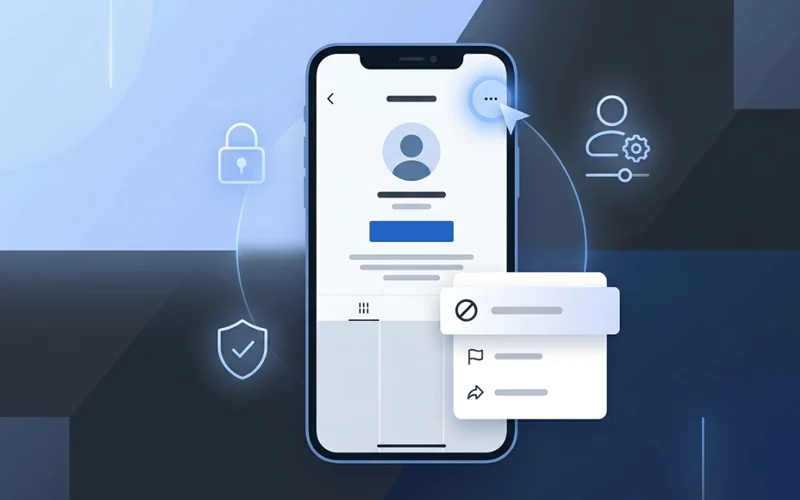
TikTok keeps growing every year, and with millions of people actively creating and sharing videos, it is normal to feel uncomfortable with certain users, comments, or unwanted interactions. Sometimes you simply want distance from someone for your peace of mind. Learning how to block someone on TikTok is one of the most effective ways to protect your privacy, avoid negativity, and maintain a safe experience on the app. Blocking is easy, private, and gives you full control over who can see your content or interact with you.
This detailed 2026 guide explains everything in simple English. You will learn how blocking works, how it affects the other person, and how to use different methods depending on your situation. Each section explains a different scenario so you can apply the right method anytime the need arises.
Understanding TikTok Blocking in 2026
Blocking on TikTok is designed to help users protect themselves from harassment, spam, awkward interactions, or unwanted attention. When you block someone, they lose access to your content completely. They cannot watch your videos, comment, send messages, or see your profile updates. You also will not see anything from them.
The person you Restrict on app does not receive any notification, as the platform handles the process completely silently to help maintain privacy and avoid unnecessary conflict. This allows you to take action with complete confidence, without concern that the other person will be notified or that it will trigger any public reaction. Once you block a user, they are simply removed from your visible interaction list without any direct message or warning being sent to them.
Removing access also helps improve and clean your overall account experience. It removes unwanted interactions and reduces clutter from your following list, followers list, and message inbox, making your TikTok usage more organized and comfortable. In addition, it gives you better control over your privacy, allowing you to manage who can interact with your content and view your profile.
In this guide, you will learn step-by-step methods for multiple situations, including when you want to block someone quietly, when you do not follow the person, when you cannot view their profile, or when the person has already blocked you. Each case requires a slightly different approach, but all are simple once you know the correct steps.
Step-by-Step User Restriction Guide
The most common and straightforward method to block a user is by visiting their profile. This section explains the direct method in 2026, using the updated interface found on most mobile devices.
To start, open the TikTok app from your home screen and make sure you are logged into the correct account. After opening the app, simply use the search bar at the top to locate the user you want to remove. You can type their username, display name, or a keyword that matches their content. When their profile appears in the search results, tap it to open the full profile page. At the top right corner, you will usually see an icon that allows you to manage interactions with that user. Select the option that leads to the privacy control. TikTok will show a confirmation window asking if you are sure you want to proceed. Once you confirm, the action is applied instantly. After this, their comments, messages, and interactions disappear from your account.
This direct method is helpful when the person is easy to find and you simply want them removed from your TikTok space without complications. It is also a good option for people who are new to application and want the simplest possible method.
Removing Someone Without Their Knowledge
A common concern many users have is whether the other person will find out. People sometimes avoid blocking because they fear drama, confrontation, or awkwardness. Fortunately, TikTok protects your privacy. This means you can learn how to block someone on TikTok without them knowing with complete confidence.
Limiting interaction happens silently. The affected user does not get any alert or message that you have restricted access. However, they might realize it indirectly over time, especially if they attempt to view your content or send you a message. They will simply see that your content is not available to them. This lack of access appears similar to a private or removed account, so they cannot be certain their access has been limited.
The best way to ensure they never suspect anything is to do the action quietly and avoid interacting with their content before you proceed. This keeps everything natural on your side. TikTok’s privacy-oriented system is designed in a way that the other person can hardly verify what actually occurred, allowing you to use this approach with confidence whenever necessary.
Managing Accounts You Don’t Follow
Sometimes the person you want to block is not someone you follow at all. They could be a stranger leaving negative comments, someone who found your videos randomly, or a user who keeps messaging you even though you aren’t connected. In such cases, you can still block them without following them first.
This process is similar to the main method, but instead of opening the user’s profile from your following list, you can easily find them through your notifications, comments section, or by using the search bar. For example, if a stranger leaves an inappropriate or unwanted comment on your post, you can simply tap on their profile picture directly from that comment.
Once you open their profile, the process remains the same. Just use the remove option from the menu, exactly as you would with any other user on application. This makes it quick and convenient to handle unwanted accounts without needing to navigate through multiple steps.
This scenario is extremely common, especially for creators who have public accounts. Understanding how to block someone on tiktok you don’t follow helps you stay in control when random users behave in ways that make you uncomfortable. You can remove them instantly without engaging in conversation or viewing more of their content.
Mobile App Method (2026 Update)
Most users today use TikTok on mobile, and the layout continues to update. When learning how to block someone on TikTok mobile, it is important to understand how the 2026 interface looks.
The current mobile design places user actions in simplified menus. When you open someone’s profile, the action button that leads to limiting access is usually found near the corner of the screen. Tapping this opens a menu with several interaction options like report, manage interaction, or remove user. Select the option, confirm your choice, and the app will apply the change instantly.
This method works on both Android and iPhone, and the experience is nearly identical across devices. Mobile blocking is quick, smooth, and designed for people who need to take fast action to maintain a safe online environment.
Restricting Access Without Opening Profile
There are times when you do not want to open the person’s profile at all. Maybe their content is disturbing, or you simply want to avoid showing them any activity from your side. Fortunately, you can still block someone without visiting their profile directly.
One method is through the comment or message area. If the person has left a comment you don’t want to deal with, long-press on the comment. A menu appears with several options, including reporting and removing access. Tap the option and confirm. This allows you to take action instantly without ever loading their profile.
Another method is through your inbox. If someone sends you a message and you do not want them in your inbox, open the message and look for the small user options icon. You will find a block option there as well. TikTok designed this feature specifically for users who prefer not to interact with a profile before blocking.
Understanding how to block someone on TikTok without viewing their profile is helpful for people who want extra privacy or wish to avoid giving the impression of engagement.
Feature Comparison
Here is a simple table to help you compare the different blocking situations and choose the best method for your needs.
Situation | Best Blocking Method | Profile Visit Required | Notes |
| Basic blocking | Direct from profile | Yes | Works for all users you can search |
| Restricting quietly | Regular method | Yes | They don’t get notified |
| Blocking strangers | From comments or search | Not always | Useful when you don’t follow them |
| Avoid profile view | From comments/messages | No | Protects privacy completely |
| Updated app layout | TikTok mobile steps | Yes | Smooth interface for 2026 |
| Being blocked first | Report or block from interactions | Sometimes | More steps needed |
Updated Safety Guide for 2026
The 2026 edition of TikTok includes several enhancements that make blocking more efficient. The app now focuses heavily on user safety and mental wellness. This version includes smoother navigation, faster block processing, and clearer confirmation screens.
When learning how to block someone on TikTok 2026, you should know that the app provides more transparency regarding what blocking does. The confirmation popup shows exactly what changes after the block, such as removed access to direct messages, videos, comments, and mentions. Another key update is that the block takes effect across all devices instantly, meaning the person cannot interact with you from another phone.
TikTok has also significantly improved its account privacy settings, giving users more control over their online experience. When you remove access for someone, you can now combine that action with additional privacy tools such as limiting comments, controlling direct messages, or hiding certain account activities from non-followers. These advanced settings allow you to fine-tune who can interact with your content and how they can engage with your profile.
Together, these privacy features create a safer, more controlled, and more comfortable environment for users on application. They not only help in reducing unwanted interactions but also enhance overall account security, making it easier for users to enjoy the platform without distractions or negativity.
What Happens When Someone Blocks You First
This situation confuses many users. When someone blocks you first, it becomes difficult to access their profile because TikTok hides it completely. But you can still block them from your side if needed.
When learning how to block someone on TikTok who blocked you, the best method is to block them through your privacy settings. Go to your settings page and locate the section for blocked accounts. TikTok allows you to manually add usernames to this list. Even if you cannot view the profile, entering the username ensures they are blocked from your side as well.
This feature is useful when you suspect someone has blocked you but you also want to prevent future interactions. It creates mutual distance and stops any potential issues before they begin.
Missing Menu Options and Solutions
Many users get confused when they try to block someone but cannot find the familiar three-dots menu on the profile. TikTok updates often lead to small interface changes. If you need how to block someone on TikTok no three dots guidance, the solution is simple once you know where to look.
Instead of the traditional three-dot menu, TikTok has now updated its interface and uses a small icon located near the top-right corner of a user’s profile. This icon may appear in different forms such as a flag, horizontal lines, or a settings-style symbol depending on the app version. When you tap on this icon, it opens a full menu of interaction options where you can manage various actions like removing access, reporting, and other account-related settings.
Although the appearance of the icon has changed in the latest TikTok updates, the core functionality remains exactly the same. Only the visual design and placement have been improved to make navigation more modern, user-friendly, and easier to access.
TikTok removed the three-dot icon to make the profile cleaner and improve visual stability across different devices. Even though the layout changed, blocking remains quick and easy after you get used to the new icon.
FAQs
What is the easiest way to block someone on TikTok?
The easiest way is to open the person’s profile, tap the menu icon in the top corner, and select the block option. After confirming, the user will be removed from your interactions immediately.
Is there a way to remove unwanted users without visiting their profile page?
Yes, in many cases you can take action directly from comments, messages, or notifications. This allows you to avoid opening their full account while still removing them from your space instantly.
What happens after I restrict someone from my account?
Once the restriction is applied, the person loses access to your content and interactions. They won’t receive any alert, but they may realize later when they cannot find your profile or content.
Can I stop a person from seeing my videos if I don’t follow them?
Yes, you are not required to follow someone in order to limit their access. Even if they are completely outside your follower list, you can still prevent them from viewing your content.
Is it possible to take action if someone has already restricted my access first?
Yes, even if another user has already limited your access, you can still take protective steps from your side using your account settings. This ensures mutual separation of interaction.
Why do some profile options look different or missing sometimes?
The interface can change depending on updates, device type, or account version. Some buttons may appear as icons instead of text, but the function remains the same even if the design changes.
Can I manage unwanted interactions directly from comments or messages?
Yes, several actions can be carried out straight from interaction sections such as comments or the inbox, without needing to open a full profile. This helps you avoid unnecessary profile visits while still maintaining full control.
Will the other person know if they lose access to my content?
No direct notification is sent. However, if they try to interact later, they may notice that your profile or content is no longer available to them.
What should I do if I cannot find the usual menu options?
If standard menu icons are not visible, it usually means the interface has updated. In such cases, look for alternative icons near the top corner or use interaction areas like comments or messages.
Is blocking permanent on TikTok?
Blocking is not permanent. You can unblock someone anytime from your settings, but while they are blocked, they cannot interact with your account.
Conclusion
Blocking is not about negativity; it is about protecting your space and ensuring your online experience remains safe, peaceful, and comfortable. Whether you want to stop harassment, avoid unwanted attention, or simply control who views your content, understanding how to block someone on TikTok is essential in 2026. This guide covered all the important scenarios, from blocking quietly to blocking without profile views, from handling strangers to dealing with users who blocked you first.
Each method is simple, private, and designed to give you confidence. TikTok continues to improve its safety tools, ensuring every user has full control over their digital environment. By using the right method for the right situation, you can enjoy a healthier, more positive TikTok journey.
If you want to read more interesting and detailed guides, visit EmbossitWorld now. You’ll find useful Information, and a lot of practical information. Don’t miss out.





Add comment