
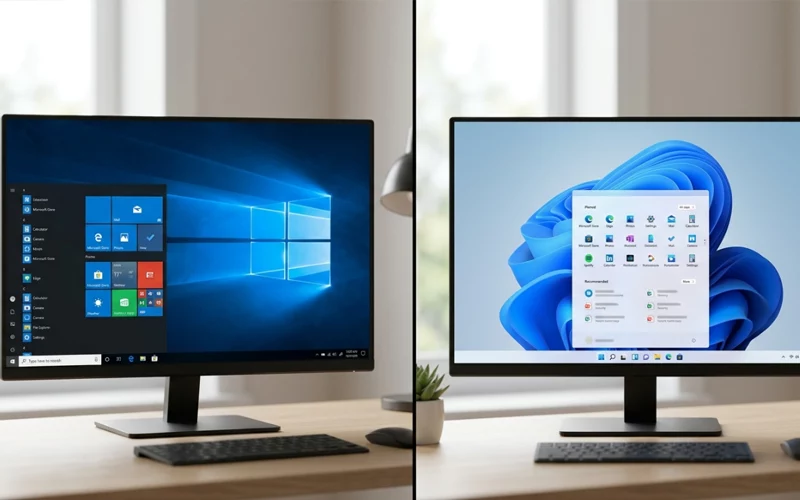
Choosing between two Windows versions sounds simple at first, but it becomes important once you think about speed, design, software support, gaming, and how comfortable the system feels in daily use. Many people still like Windows 10 because it feels familiar, while others prefer Windows 11 because it looks modern and adds newer tools. The truth is, there is no one fixed answer that fits every user. It depends on the kind of work you do, the device you use, and how much you care about change.
This guide breaks everything down in plain English so you can understand the real difference without technical confusion. The goal is to help you decide which one fits your needs better, not just which one looks newer. By the end, you will have a much clearer idea of windows 10 vs windows 11 and which one makes more sense for your computer and your daily routine.
Windows 10 vs Windows 11 Key Changes
At first glance, Windows 11 looks like a fresh coat of paint, but the changes go beyond appearance. The Start menu is centered, the taskbar feels cleaner, and windows have softer corners. Some people like this modern look right away, while others miss the older layout from Windows 10. That reaction is normal because habits matter a lot when people use a computer every day.
The biggest shift is not only visual. Windows 11 is built with a more modern approach to multitasking, touch use, and newer hardware. It tries to make the desktop feel less crowded and more organized. Windows 10, on the other hand, keeps a more traditional feel that many users already know well. That is why the debate about windows 10 vs windows 11 features comparison often comes down to comfort versus freshness.
For some users, Windows 10 still feels easier because everything is where they expect it to be. For others, Windows 11 feels calmer and more polished. Neither version is bad. They simply serve different kinds of users in slightly different ways.
Design, Comfort, and Daily Use
One of the first things people notice is how the desktop feels when they open the system. Windows 11 has a cleaner interface with more spacing and a softer style. It is designed to feel simpler, especially for people who do not want too many visual distractions. If you spend hours staring at your screen, that cleaner look can feel pleasant.
Windows 10 is more classic and direct. It gives you a familiar layout that many long-time users already know by heart. For people who work fast and do not want to relearn basic actions, that familiarity can be a major advantage. Some users feel more productive on Windows 10 simply because they already know how to move around it without thinking.
The practical side matters too. Windows 11 makes certain actions smoother, especially when organizing multiple open windows. Snap Layouts help you place apps in neat positions more quickly. Windows 10 can do similar things, but not always as elegantly. That is one reason many people say Windows 11 feels more polished in everyday use.
Still, comfort is personal. A newer design is not automatically better if it slows you down. This is why the question is windows 11 better than windows 10 does not have one fixed answer. The better choice is the one that feels easier for your habits.
System Requirements and Hardware Fit
Before deciding, you should think about your computer itself. Not every PC that runs Windows 10 can comfortably run Windows 11. Windows 11 is more selective about the hardware it accepts, which means older machines may not qualify or may not run it as smoothly. This is why windows 10 vs windows 11 system requirements matter so much in real life.
Windows 10 is usually the safer choice for older laptops and desktops. It works well on a wider range of devices, including machines that are not very powerful. If your PC is several years old, Windows 10 may feel lighter and more practical. Windows 11 prefers newer systems with stronger security features and more modern components, so it is naturally more demanding.
This difference is important because people often focus on looks and ignore compatibility. A computer that technically supports an operating system is not always the same as a computer that runs it comfortably. If your device is already slow, moving to a heavier system can make the experience frustrating instead of better.
So before switching, it is smart to check whether your machine has enough headroom for the newer system. Sometimes the best decision is not the newest one, but the one that keeps your device stable and responsive.
Speed, Stability, and Real Performance
Performance is one of the main reasons people compare these two systems. In general, Windows 11 can feel very smooth on newer hardware, especially when running multiple apps or switching between tasks. It has been tuned for modern processors and newer laptop designs. That said, performance is not only about raw speed. It also depends on how well the system matches your device.
On older hardware, Windows 10 may still feel more stable and less heavy. It often uses fewer resources, which can make a big difference on machines with limited memory or weaker processors. When people discuss windows 10 vs windows 11 performance comparison, the most honest answer is that each version performs best in the environment it was made for.
Windows 11 can offer a more refined experience if your PC is modern. Apps may open smoothly, window management may feel better, and the interface can seem more responsive. Windows 10 can still be very dependable, especially if your device is not powerful enough to benefit from the newer system’s design.
In simple terms, Windows 11 is not always faster just because it is newer. A good match between hardware and software matters much more than the version number itself. If the system fits your PC well, you will feel the difference in daily use.
Gaming and Entertainment
For many people, gaming is one of the biggest reasons to compare operating systems. Windows has always been important for PC gaming, and both versions can handle a large number of popular games. The difference usually shows up in how well the system uses newer hardware features and how smoothly it supports modern gaming tools.
On newer machines, Windows 11 can offer an advantage in some cases because it is designed with recent hardware in mind. That makes it more attractive to people who want the latest gaming support and a system that feels up to date. For this reason, windows 10 vs windows 11 gaming performance 2026 is a topic many players care about, especially if they want the best experience on a current PC.
Windows 10 still works very well for gaming, though. Many games run smoothly on it, and a lot of players have spent years using it without problems. If your system is older or you do not want to change a setup that already works well, Windows 10 can still be a solid choice.
The real question is not only whether a system can run games, but whether it can do so comfortably while staying cool, stable, and responsive. If you play casually, both versions can be fine. If you want a more modern platform and your hardware is ready for it, Windows 11 may feel more future-focused.
Everyday Features That Matter
A lot of comparisons focus on big changes, but small features often shape the user experience more than expected. Windows 11 brings a better sense of organization in multitasking. It also gives the desktop a more balanced feel, which can help when you keep many apps open at once. The new layout is meant to reduce clutter and make the screen easier to scan.
Windows 10 has its own strengths. It is straightforward, predictable, and easy to use for people who do not want to relearn familiar actions. Many users like how quickly they can right-click, search, open settings, or pin apps. There is a quiet efficiency in that older style that still matters a lot.
When people search for windows 10 vs windows 11 differences 2026, they often expect dramatic changes. The truth is more practical than dramatic. The difference is not only in design, but in how each system handles daily tasks, how modern the interface feels, and how much adjustment the user is willing to make.
For office work, school tasks, browsing, and general home use, both can be effective. The better choice depends on whether you want something familiar and simple or something newer and more polished.
Strengths and Weaknesses of Each Version
Every operating system has good sides and weak sides, and being honest about both helps people make better decisions. Windows 10 is easy to understand, familiar for many users, and often friendlier for older computers. Its biggest strength is comfort. Its weakness is that it feels less modern and may not be the best long-term choice for newer hardware.
Windows 11 feels cleaner, more current, and better aligned with modern computers. It offers a fresher experience and some useful productivity improvements. Its weakness is that it may feel unnecessary or less convenient for users who love the older layout. It can also be less ideal on machines that are not built for it.
This is where the topic windows 10 vs windows 11 pros cons becomes useful. Windows 10 is strong in familiarity and broad compatibility. Windows 11 is strong in design, newer features, and modern support. Neither one wins in every category. The better option depends on what matters more to you: comfort, compatibility, or a newer feel.
A practical way to think about it is this: if your PC is older and already runs well on Windows 10, there is no rush to fix what is not broken. If your PC is newer and you want a cleaner, more updated experience, Windows 11 may be the better long-term choice.
Frequently Asked Questions (FAQs)
1. What is the main difference between Windows 10 vs Windows 11?
Windows 11 has a modern design, improved multitasking tools, and better optimization for new hardware, while Windows 10 offers a more traditional layout and wider compatibility with older systems.
2. Is Windows 11 better than Windows 10 for daily use?
Windows 11 can feel smoother and more organized on modern PCs, but Windows 10 is still easier for users who prefer a familiar and simple interface.
3. Should I upgrade from Windows 10 to Windows 11 in 2026?
If your device supports Windows 11 and runs smoothly, upgrading is a good option. If your system is older, staying on Windows 10 may still be more stable.
4. What are the system requirements for Windows 10 vs Windows 11?
Windows 11 requires newer processors, TPM 2.0, and more security features, while Windows 10 works on a much wider range of older computers.
5. Which is faster Windows 10 or Windows 11?
On newer hardware, Windows 11 can feel faster and more responsive. On older PCs, Windows 10 often performs more smoothly due to lower system demands.
6. How is gaming performance on Windows 10 vs Windows 11?
Gaming performance is similar on both systems, but Windows 11 can offer better optimization for newer gaming technologies and hardware support.
7. Can Windows 10 still be used in 2026?
Yes, Windows 10 can still be used in 2026, but support is gradually ending, so users may need to consider upgrading in the future.
8. What are the pros and cons of Windows 11 compared to Windows 10?
Windows 11 offers a modern design, better multitasking, and future updates, while Windows 10 provides familiarity, stability, and wider compatibility.
9. Is Windows 11 good for low-end PCs?
Windows 11 is not ideal for low-end or older PCs. Windows 10 is usually a better option for weaker hardware.
10. What are the biggest Windows 10 vs Windows 11 differences in 2026?
The biggest differences are design, system requirements, multitasking features, and long-term support strategy.
So Which One Should You Choose?
The final decision should be based on your real use, not hype. If you want a system that feels familiar, runs well on older hardware, and avoids unnecessary change, Windows 10 may still suit you better. If you want a more modern look, better organization, and stronger support for newer devices, Windows 11 may be the smarter direction.
For most people, the answer comes down to this simple rule: choose the version that makes your computer easier to use every day. A good operating system should not create stress. It should make work smoother, gaming easier, and navigation more natural.
The debate around windows 10 vs windows 11 will keep going because people value different things. Some want comfort, some want modern features, and some want the best performance from a newer machine. What matters most is not which version sounds better in theory, but which one actually helps you do your work without frustration.
If your computer is newer, Windows 11 is often the more forward-looking choice. If your computer is older and already feels reliable, Windows 10 may still be the more sensible option. In the end, the best system is the one that fits your needs, your hardware, and your daily habits without making simple tasks feel harder than they should be.
If you want to read more interesting and detailed guides, visit EmbossitWorld now. You’ll find useful Information, and a lot of practical information. Don’t miss out.





Add comment