
Introduction
The internet has become a vital part of modern daily life. We use it to send messages, attend classes, work remotely, watch videos, shop online, play games, run businesses, and access information. But the way people connect to the internet can be very different depending on where they live, what services are available, and how much performance they need.
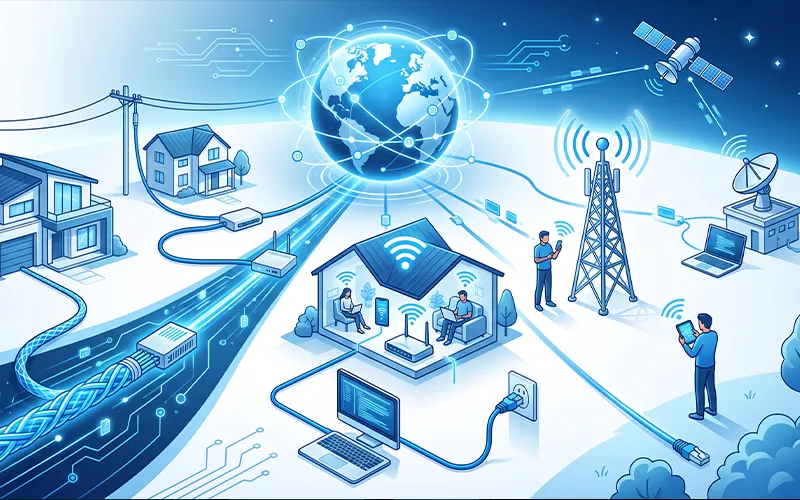
Some homes receive internet through fiber-optic cables, while others use cable networks, telephone lines, wireless signals, cellular networks, or satellites. Each option works differently and comes with its own advantages and drawbacks.
Knowing about the types of internet can help you make a smarter choice when selecting an internet plan. A fast connection is useful, but speed alone does not determine overall performance. Upload performance, latency, reliability, coverage, equipment, data limits, and monthly cost can all affect your experience.
For example, a person who mainly checks email and reads websites may not need the same connection as a family that streams several videos at once. Likewise, someone living in a rural location may have fewer choices than someone living in a large city.
This guide explains the main types of internet connections, how they work, what they are best suited for, and what to consider before choosing one. It also explains related topics such as internet services, cables, browsers, domains, security, cookies, advertising, and online marketing.
What Is an Internet Connection?
An internet connection is the link that allows a device or local network to communicate with other computers and servers through the internet.
When you open a website, your phone or computer sends a request through your router or mobile network. Your internet provider then carries that request across its network and other connected networks until it reaches the server hosting the website. The server sends information back, and your browser displays it on your screen.
All of this usually happens within seconds or even less.
The quality of your connection can influence how quickly websites load, how smoothly videos play, how responsive online games feel, and whether video calls remain stable.
Several measurements are useful when judging an internet connection:
- Download Speed: The rate at which information is transferred from the internet to your device.
- Upload speed: How fast your device can transfer information to an online server.
- Latency: The amount of time data takes to travel between two points.
- Reliability: How consistently the connection stays available.
- Bandwidth: The amount of data a connection can handle over a given period.
A good internet connection is therefore more than simply having a large speed number on your package.
How Do Internet Connections Work?
Different internet technologies move data in different ways.
Wired connections rely on physical infrastructure. Depending on the service, information may travel through fiber-optic cables, coaxial cables, or copper telephone lines.
Wireless services use radio signals. Fixed wireless systems communicate between an antenna at the customer’s property and equipment operated by the provider. Mobile broadband uses cellular towers, while satellite services communicate through satellites in space.
At home, another layer is involved. Your provider may deliver the service through fiber or cable, but your devices may access that connection through Wi-Fi or Ethernet.
For example, a desktop computer might use an Ethernet cable, a laptop might connect through Wi-Fi, and a smartphone might use the same Wi-Fi network. All three devices can share one internet connection.
This is why slow internet does not always mean the provider is responsible. The router, Wi-Fi signal, device, or local network can also create performance problems.
Popular Internet Connection Methods
People can access the internet through a variety of connection methods. The most common options include fiber-optic, cable, DSL, fixed wireless, satellite, mobile broadband, and dial-up.
The right choice depends on availability and how you use the internet.
- Fiber-Optic Internet
Fiber-optic internet sends information using pulses of light through very thin strands of glass or plastic.
It is one of the most advanced broadband technologies available to consumers and is known for high speeds, strong upload performance, and low latency.
Fiber can be an excellent choice for households where several people use the internet at the same time. A family might have one person attending a video meeting, another streaming a movie, another playing an online game, and someone else uploading large files.
The connection can handle demanding workloads more comfortably than many older technologies.
Advantages of Fiber
- Very high download speeds
- Excellent upload speeds
- Low latency
- Strong performance for multiple users
- Good option for gaming and video conferencing
- Suitable for large file transfers
Limitations of Fiber
The main problem is availability. Building a fiber network requires substantial infrastructure, so it may not be offered in every neighborhood.
Installation can also take longer or cost more in areas where fiber infrastructure has not already been established.
Best for: Heavy internet users, gamers, remote workers, businesses, creators, and large households.
- Cable Internet
Cable internet uses coaxial cable infrastructure to deliver broadband service. This infrastructure has been widely installed in residential areas, making cable a common choice for home users.
Cable connections can provide fast download speeds and are suitable for everyday activities such as streaming, browsing, gaming, video calls, and downloading files.
One thing to keep in mind is that network capacity can sometimes be shared among customers in the same local area. During busy periods, performance may vary depending on the provider’s network design and capacity.
Advantages of Cable
- Good download performance
- Widely available in many locations
- Suitable for streaming
- Works well for typical home use
- Usually easier to obtain than fiber in some areas
Limitations of Cable
- Upload speeds may be lower than download speeds
- Performance can vary during periods of heavy local usage
- Availability depends on the provider’s network
Best for: Families, streamers, home offices, and general broadband users.
- DSL Internet
DSL stands for Digital Subscriber Line. It uses telephone-line infrastructure to provide internet access.
DSL played an important role in the development of broadband because it provided a much more practical experience than traditional dial-up connections.
Its performance depends on the specific DSL technology, the condition of the telephone line, and the distance between the customer and the provider’s equipment.
In locations with modern fiber or cable networks, DSL may no longer be the fastest option. However, it can still provide useful internet access in areas where newer broadband infrastructure has not reached.
Advantages of DSL
- Uses existing telephone infrastructure
- Available in some areas without cable or fiber
- Generally suitable for basic online activities
- More capable than traditional dial-up
Limitations of DSL
- Usually slower than modern fiber
- Performance can decrease with distance
- Upload speeds may be limited
- Availability and quality vary by location
Best for: Basic browsing, email, light streaming, and locations with limited broadband choices.
- Fixed Wireless Internet
Fixed wireless delivers internet service using radio signals rather than a cable running directly into the home.
A provider normally installs an antenna or receiver at the customer’s property. The equipment communicates with a nearby transmission point.
This approach can be especially useful in rural and suburban communities where installing fiber or cable to every property would be difficult or expensive.
The quality of the service depends on the distance between the customer and transmission equipment, obstacles, signal strength, weather, network congestion, and the technology used.
Advantages of Fixed Wireless
- Useful where wired broadband is unavailable
- Can reach rural communities
- Does not require a traditional cable connection to the property
- Installation can be practical in certain locations
Limitations of Fixed Wireless
- Requires suitable signal conditions
- Trees, buildings, and terrain can interfere
- Performance can vary by provider and location
- Capacity may be shared
Best for: Rural and suburban users who do not have convenient access to wired broadband.
- Satellite Internet
Satellite internet provides connectivity through communication satellites.
Its greatest strength is coverage. It can serve locations where laying fiber, cable, or telephone infrastructure is difficult.
For people living in remote areas, satellite service may provide an internet option when terrestrial broadband is unavailable.
The main concern has traditionally been latency. Data has to travel a long distance between the user’s equipment and satellite infrastructure, which can introduce noticeable delay.
Newer satellite systems have improved performance considerably, but customers should still compare coverage, expected speeds, latency, data policies, equipment costs, and service conditions before choosing a plan.
Advantages of Satellite
- Can reach remote locations
- Does not require local cable infrastructure
- Useful where traditional broadband is unavailable
- Expands internet access to difficult-to-reach areas
Limitations of Satellite
- Latency can be higher than many wired connections
- Weather and environmental conditions may affect service
- Equipment may be required
- Plans and performance vary between providers
Best for: Remote homes, rural locations, and areas without reliable terrestrial broadband.
- Mobile Broadband
Mobile broadband uses cellular networks to provide internet access.
Smartphones use this technology every day, but mobile broadband can also be used through hotspots, tablets, laptops, USB devices, and cellular routers.
The biggest advantage is flexibility. Instead of being tied to one fixed location, users can connect while traveling or moving between locations.
Performance depends on cellular coverage, network generation, signal strength, congestion, and the location of the user.
Advantages of Mobile Broadband
- Portable
- Convenient for travelers
- Works through cellular networks
- Useful as a backup connection
- Can provide internet without fixed broadband
Limitations of Mobile Broadband
- Coverage varies by location
- Speeds can change throughout the day
- Network congestion may reduce performance
- Data limits may apply to some plans
Best for: Travelers, temporary setups, mobile workers, and backup connectivity.
- Dial-Up Internet
Dial-up is an older form of internet access that uses a telephone line and modem.
It was once one of the most common ways people connected to the internet. Users had to establish a connection through their telephone line before accessing online services.
Compared with modern broadband, dial-up is extremely slow. It also had the major disadvantage of tying up the telephone line while the connection was active.
Today, dial-up is mostly obsolete, but understanding it helps explain how internet access has developed over the years.
Best for: Historical understanding rather than modern everyday internet use.
How Should You Compare Different Internet Connections?
Choosing an internet service based only on advertised download speed can lead to a poor decision.
There are several factors worth checking before signing up.
Download Speed
Download speed affects activities such as browsing, watching videos, downloading applications, and receiving files.
Higher speed can be useful when multiple people are using the connection simultaneously.
Upload Speed
Upload performance matters when you send files, upload videos, use cloud backups, host online meetings, or work with remote systems.
For content creators and remote workers, upload speed can be particularly important.
Latency
Latency refers to the time it takes for information to travel between your device and another system.
Low latency is especially valuable for online gaming, video calls, remote desktop applications, and other interactive activities.
Reliability
A fast connection is not very useful if it frequently disconnects.
Before choosing a provider, consider whether the service has a reputation for stable performance in your area.
Availability
The best technology on paper is useless if it is not available at your address.
Always check which services actually cover your location.
Cost
Look beyond the advertised monthly price. Installation fees, equipment charges, taxes, contracts, and promotional pricing can change the actual cost.
What Does a Router Do?
A router connects a local network with the internet and manages communication between devices.
In a typical home, the router receives the internet service and distributes it to phones, computers, smart TVs, gaming consoles, printers, and other connected devices.
Many modern routers also include Wi-Fi and basic security functions.
Where the router is placed can influence wireless performance. Thick walls, furniture, interference, distance, and the number of connected devices can weaken Wi-Fi performance.
This explains why one device may experience poor connectivity while another device in the same home works normally.
How Internet Connectivity Has Changed
Internet access has changed dramatically over the past several decades.
Dial-up connections were once common and provided only limited speeds. Broadband later made internet access much faster and more practical.
Cable and DSL expanded broadband availability, while fiber networks introduced much higher capacity and lower latency.
Wireless technology has also changed the way people access online services. Mobile networks allow users to connect while traveling, while fixed wireless and satellite services can reach areas where traditional wired infrastructure is difficult to install.
At the same time, cloud computing, streaming, remote work, online education, and digital businesses have increased the amount of data people use every day.
The Future of Internet Connectivity
Internet technology will continue to evolve.
Providers are investing in faster fiber networks, improved wireless systems, expanded cellular coverage, and newer satellite technologies.
However, the future of connectivity is not only about achieving higher download speeds.
Low latency, reliability, coverage, security, network capacity, and energy efficiency are also important.
The growing use of artificial intelligence, connected devices, cloud applications, smart homes, online education, remote work, and digital businesses will create additional demand for dependable networks.
As more devices become connected, internet infrastructure will need to handle larger amounts of traffic while maintaining reliable performance.
Frequently Asked Questions
1. What are the main ways to access the internet?
People can get online through fiber, cable, DSL, fixed wireless, satellite, mobile networks, and other connection technologies. Availability depends on the location and provider.
2. Which internet connection is best for home use?
Fiber is often a strong choice for homes because it can offer fast speeds, good upload performance, and low latency. However, the best option depends on local availability and your household’s needs.
3. Is fiber internet faster than cable?
Fiber can provide higher speeds and better upload performance than many cable plans. Actual performance varies by provider and package.
4. Is DSL still useful today?
DSL can still be useful in areas where fiber or cable services are not available. It is generally better suited to basic browsing, email, and light online activities.
5. What is fixed wireless internet?
Fixed wireless provides internet through radio signals between a customer’s location and a provider’s nearby equipment. It can be useful in rural or less-developed areas.
6. How does satellite internet work?
Satellite service sends data between the user’s equipment and communication satellites. It can provide access in remote areas where wired broadband is difficult to install.
7. What should I consider before choosing an internet plan?
Look at more than download speed. Upload performance, latency, reliability, coverage, data limits, equipment costs, and the monthly price can all affect your choice.
8. Which internet connection is suitable for gaming and streaming?
A stable connection with enough bandwidth and low latency is generally preferable. Fiber can be a good option, while cable and other technologies may also work well depending on local conditions.
Final Thoughts
Internet access has come a long way from the days of dial-up connections. Today, people can choose from several technologies, including fiber, cable, DSL, fixed wireless, satellite, and mobile broadband.
Each option has a different combination of speed, latency, reliability, availability, and cost. Because of this, there is no single connection that is perfect for everyone.
A student who mainly browses the web may have modest requirements. A family with several users may need greater capacity. A gamer may care heavily about latency, while a video creator may prioritize upload speed. Someone in a remote location may focus primarily on availability.
It is also useful to understand the systems that work alongside the connection. Routers distribute internet access around homes, cables carry data across long distances, DNS connects domain names with IP addresses, and browsers turn web resources into pages people can use.
Security should not be overlooked either. Strong passwords, multi-factor authentication, software updates, encryption, and careful browsing habits can all help protect online accounts and information.
The internet will continue to change as fiber networks expand, wireless technology improves, satellite systems develop, and more devices move online.
The most important lesson is simple: choosing an internet connection should be based on your actual needs, not just the highest advertised speed. Understanding how each option works makes it much easier to select a service that provides the right balance of performance, reliability, availability, and cost.





Add comment