
Introduction
Managing a project can look easy when it involves only a few tasks and one or two people. The situation changes quickly when a project includes several team members, multiple deadlines, important documents, changing requirements, budgets, meetings, and regular updates. Without a clear system, even a well-planned project can become difficult to control. People may forget deadlines, duplicate work, miss important messages, or spend too much time asking others for progress updates. Digital project management platforms are designed to solve many of these everyday problems by bringing tasks, schedules, communication, files, and progress information into one organized workspace.
For beginners, choosing and understanding project management softwar can seem complicated because there are many different platforms available. Some are made for freelancers and small teams, while others are designed for large companies with hundreds or thousands of employees. There are also specialized solutions for construction companies, software developers, marketing agencies, SEO professionals, and enterprise organizations. The right choice depends on what a team actually needs rather than how many features a particular platform advertises.
This guide explains how these platforms work, why businesses use them, what features are important, and how different industries can benefit from them. It also looks at free solutions, cloud-based systems, Microsoft options, agile workflows, and specialized tools. Whether you are managing your first personal project or helping a growing company organize its work, understanding the basics can help you make a smarter decision.
What Is Project Management Software?
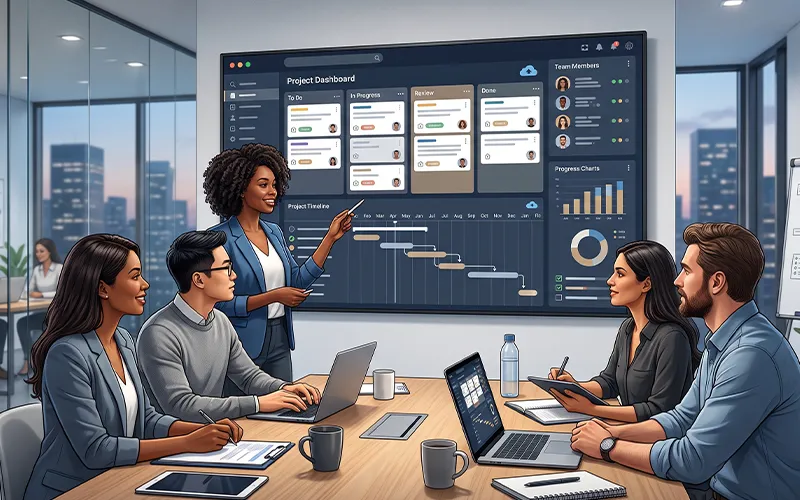
The simplest way to understand project management softwar is to think of it as a digital workspace for organizing project-related work. Instead of keeping tasks in notebooks, spreadsheets, emails, and separate chat conversations, a team can place much of its important information inside one system. Users can normally create projects, add tasks, assign responsibilities, set deadlines, attach files, communicate with colleagues, and follow progress.
A project platform can also make responsibilities clearer. For example, if a company is launching a new website, different people may be responsible for design, development, content, testing, SEO, and final approval. Each assignment can be given to the appropriate person with a deadline and description. Everyone involved can then understand what they are expected to do without depending on repeated meetings.
More advanced platforms can provide calendars, timelines, dashboards, reports, time tracking, budgeting, automation, resource planning, and integrations. These features are particularly useful when projects become larger and more difficult to manage manually. However, beginners do not necessarily need every advanced feature. A simple system that the team uses consistently can be more valuable than a complicated platform that employees find difficult to understand.
Essential Features Every Beginner Should Understand
Before choosing a platform, it helps to understand the features that are commonly available. Task management is usually the starting point. A good system should make it easy to create tasks, assign them to people, set due dates, add descriptions, and mark work as completed. Some platforms also allow users to divide large assignments into smaller subtasks.
Scheduling is another important feature. Calendar views can show upcoming deadlines, while timeline or Gantt-style views can help users understand how different activities relate to each other. If one task cannot begin until another is finished, dependencies can make this relationship easier to manage.
Communication features are also useful. Instead of discussing a task in a separate messaging application and losing the conversation later, team members can often leave comments directly on the related assignment. Files, links, notes, and decisions can stay connected to the work they belong to.
Reporting becomes more important as a project grows. Managers may want to know how many tasks are complete, which assignments are overdue, how much work remains, or where resources are being used. Some systems can turn this information into dashboards and visual reports.
Integrations can provide another layer of convenience. A platform may connect with calendars, cloud storage, email, customer relationship systems, accounting applications, communication tools, or development services. The value of an integration depends on whether it actually improves the team’s workflow.
Construction Project Management Software
Construction work has special requirements that are different from those of a typical office project. A construction project can involve architects, contractors, suppliers, engineers, supervisors, workers, clients, budgets, materials, inspections, and changing site conditions. Keeping all these moving parts organized can be challenging.
Construction project management software is designed to help teams handle many of these activities. Depending on the platform, users may be able to manage schedules, documents, assignments, budgets, progress updates, approvals, and communication from one place.
Cloud based construction project management software can be particularly useful when project managers work in an office while supervisors and workers spend most of their time at a construction site. Information can be updated from different locations, reducing the need to transfer everything through paper records or repeated phone calls.
The right system can also improve visibility when delays occur. If a material shipment is late or an earlier stage of construction takes longer than expected, managers can update the schedule and communicate the change to relevant people. This does not eliminate construction problems, but it can make them easier to identify and manage.
Managing Software Development Projects
Software development has its own challenges because requirements can change during the development process. Customers may request new features, developers may discover technical limitations, and testing can reveal issues that were not visible at the beginning.
This is why software project management software often focuses heavily on flexibility, issue tracking, task dependencies, releases, and collaboration. Development teams need to know which features are being worked on, which problems are still open, and what should be prioritized next.
Agile project management software is particularly useful for teams that follow agile methods. Instead of attempting to plan every detail months in advance, teams can organize work into smaller cycles and review progress regularly. This makes it easier to respond to new information.
An agile workflow can include a product backlog, sprint planning, task boards, development assignments, testing activities, and review stages. The exact process varies between teams, but the basic goal is to make progress visible while allowing plans to change when necessary.
Marketing and SEO Project Workflows
Marketing departments frequently manage several activities at the same time. A campaign may require written content, graphics, videos, social media posts, advertisements, landing pages, email campaigns, and analytics. If each activity is handled separately, deadlines can quickly become difficult to coordinate.
Marketing project management software can bring campaign activities together and give team members a shared schedule. Writers can see when content is due, designers can check upcoming creative requirements, and managers can monitor the overall campaign.
SEO work can also benefit from structured planning. SEO project management software can be used to organize keyword research, content briefs, technical audits, optimization tasks, link-building activities, content updates, and reporting. Since SEO is usually a long-term process, keeping a record of completed and upcoming work can be extremely helpful.
A structured workflow also makes collaboration easier between SEO specialists and content teams. For example, an SEO professional can provide recommendations through a task, while the writer can update the same assignment when the content is completed. This keeps the process connected instead of spreading information across multiple conversations.
The Rise of Cloud-Based Platforms
Cloud technology has changed the way many businesses manage their work. Traditional software may require installation on specific computers or servers, while cloud platforms can generally be accessed through an internet connection.
Cloud project management software is useful for remote teams because employees can access project information from different locations. A team member working from home can review assignments, while another employee in an office can update the same project. This can be particularly valuable for companies that operate across cities or countries.
Another benefit is easier information sharing. Team members do not necessarily need to email the latest spreadsheet to everyone because project information can remain in a shared workspace.
However, cloud services should not be selected based on convenience alone. Businesses should consider account security, user permissions, data protection, backups, integrations, support, and the provider’s reliability. Project information may include confidential documents and business details, so responsible access management is important.
Free Options for Beginners
Not every user needs an expensive subscription. Project management software free plans can be useful for students, freelancers, individuals, and small teams that are starting with basic project organization.
Free plans often include fundamental features such as task lists, simple collaboration, deadlines, and limited storage. They can be a good way to learn how a platform works before committing to a paid plan.
The best free project management software depends on the user’s requirements. A freelancer managing five simple client projects may be perfectly comfortable with a free plan, while a growing agency may quickly need additional users, storage, automation, reporting, or integrations.
It is important to check the limitations before selecting a free option. Some providers restrict the number of users, active projects, features, or available storage. A free plan can be useful, but it should be evaluated according to actual needs rather than price alone.
How to Choose the Right Solution
Choosing between the top project management software options becomes easier when you first identify the problems you want to solve. Do you mainly need task tracking? Are deadlines being missed? Is communication scattered? Do managers need better reports? Or does your business require resource and budget planning?
Team size should also influence the decision. A solo professional does not need the same system as a company with multiple departments. Smaller teams may prefer simplicity, while larger organizations often need stronger permissions, reporting, and administrative controls.
Industry requirements matter as well. A construction company may need site-related features, while a software company may require agile boards and development integrations. A marketing agency may care more about content calendars, campaign workflows, and client approvals.
Cost should be evaluated beyond the starting subscription. Consider the price of additional users, storage, premium features, integrations, and future upgrades. A platform that appears inexpensive initially may become costly as the team grows.
Most importantly, test the user experience. The best platform is one that employees understand and use regularly. A complicated system with impressive features will not deliver much value if the team avoids using it.
Microsoft Solutions for Project Planning
Microsoft project management software can be an option for organizations that already depend heavily on Microsoft’s business ecosystem. Companies using Microsoft productivity and collaboration services may find value in keeping project-related work within a familiar environment.
Microsoft’s project-focused solutions can support areas such as scheduling, planning, resource management, task tracking, and reporting. The exact capabilities depend on the specific product and subscription being used.
Businesses should still compare these options with other providers. Existing technology is an important consideration, but it should not be the only one. The chosen platform should match the organization’s workflow, employee skills, project complexity, and budget.
For companies already using several Microsoft services, integration can be a strong reason to investigate its project planning options. For other businesses, a different platform may offer a simpler or more specialized experience.
Enterprise-Level Project Management
Large organizations face a different level of complexity. They may have many departments working on dozens or hundreds of projects simultaneously. Leadership needs to understand not only whether individual tasks are complete but also whether projects are aligned with broader business goals.
Enterprise project management software is designed for these environments. Such platforms can provide portfolio management, resource planning, advanced reporting, permissions, financial tracking, risk management, and strategic oversight.
At the enterprise level, project management is not simply about checking off tasks. Leaders may need to decide which projects should receive additional resources and which ones should be delayed or reconsidered.
Implementation also requires careful planning. Large organizations may need employee training, workflow design, system integrations, permission structures, data migration, and ongoing administration. Technology alone cannot create effective project management; people and processes still determine how successfully the platform is used.
Mistakes to Avoid
One of the most common mistakes is selecting a platform because it has the largest feature list. More features do not automatically produce better results. If employees need extensive training just to perform simple tasks, the system may create more problems than it solves.
Another mistake is creating too many tasks. Breaking a project into useful steps is helpful, but turning every tiny action into a separate assignment can make the workspace overwhelming.
Ignoring updates is another problem. A dashboard is only useful when the information inside it is reasonably accurate. If employees stop updating tasks, managers may make decisions based on outdated information.
Businesses should also avoid expecting software to replace good management. Technology can organize information and improve visibility, but it cannot create realistic deadlines, resolve team conflicts, define business priorities, or make difficult decisions.
Project management softwar works best when it supports a well-designed process rather than attempting to replace one.
Current Trends in the Industry
Keeping up with project management software news can help businesses understand where the industry is heading. Modern platforms are increasingly adding automation, artificial intelligence, advanced reporting, remote collaboration, and workflow customization.
Artificial intelligence is becoming especially interesting. Some platforms can help summarize updates, create task descriptions, analyze information, or identify possible issues. These features can reduce routine work, although important decisions should still receive human attention.
Remote and hybrid work are also influencing product development. Businesses increasingly need tools that allow employees to collaborate regardless of location. Cloud access, mobile applications, notifications, and real-time updates are therefore becoming important parts of modern workflows.
Another trend is stronger integration between project systems and other business applications. Companies want their tools to communicate with each other so employees do not have to enter the same information repeatedly.
Frequently Asked Questions
1. What is project management software mainly used for?
It is mainly used to organize and monitor project work. Teams can create tasks, assign responsibilities, set deadlines, share documents, communicate about assignments, and track progress. More advanced platforms may also support budgeting, resource planning, reporting, automation, and portfolio management.
2. Can beginners use project management platforms?
Yes. Beginners can start with basic features such as task lists, deadlines, calendars, and comments. There is no need to activate every feature immediately. Starting with a simple workflow allows users to learn the system without becoming overwhelmed.
3. What makes the best free project management software?
The right free option should provide the features needed for the user’s specific workflow without creating unnecessary restrictions. Important considerations include the number of users, storage limits, task features, collaboration options, integrations, and whether the platform can grow with the team.
4. Is construction software different from regular project tools?
Construction-focused systems often provide features that are more relevant to building projects, such as site updates, construction schedules, document handling, contractor communication, and field-related workflows. Regular platforms can still be useful, but specialized solutions may better match complex construction requirements.
5. Why do software development teams use agile tools?
Agile tools help development teams organize work into smaller cycles and respond to changing requirements. They can support backlogs, sprint planning, task boards, issue tracking, reviews, and development priorities. This gives teams greater flexibility during the development process.
6. Can marketing agencies use these platforms?
Yes. Marketing teams can use them to manage campaigns, content, social media activities, design work, advertising tasks, client approvals, and deadlines. They can also help different specialists coordinate their work around the same campaign.
7. Is cloud-based project management safe?
Cloud platforms can provide strong security, but businesses should still review the provider’s security practices, access controls, permissions, backup policies, and data protection measures. Users should also protect their accounts with strong passwords and appropriate authentication methods.
8. How should a company choose a project management platform?
A company should begin by identifying its team size, project type, workflow problems, budget, collaboration needs, and required integrations. It should then compare suitable options and test them with real projects. Ease of use should be considered alongside features and price because employee adoption is essential for long-term success.
Final Thoughts
Project management becomes much easier when information is organized, responsibilities are clear, and everyone can see what is happening. A good digital platform can bring these elements together and provide a more structured way to manage everyday work.
From freelancers and small businesses to construction companies and large enterprises, different organizations can benefit from different types of solutions. Some teams may need simple task lists, while others require advanced scheduling, resource planning, reporting, automation, or industry-specific features.
The most suitable project management softwar is not necessarily the most expensive or the one with the longest feature list. It is the solution that matches the team’s actual requirements and remains simple enough for people to use consistently.
Before making a purchase, identify the biggest challenges in your current workflow, compare suitable platforms, test the user experience, and consider how the system will support future growth. With the right approach, project management technology can save time, improve communication, increase visibility, and help teams complete their work with fewer avoidable problems.
If you want to read more interesting and detailed guides, visit EmbossitWorld now. You’ll find useful Information, and a lot of practical information. Don’t miss out.





Add comment