
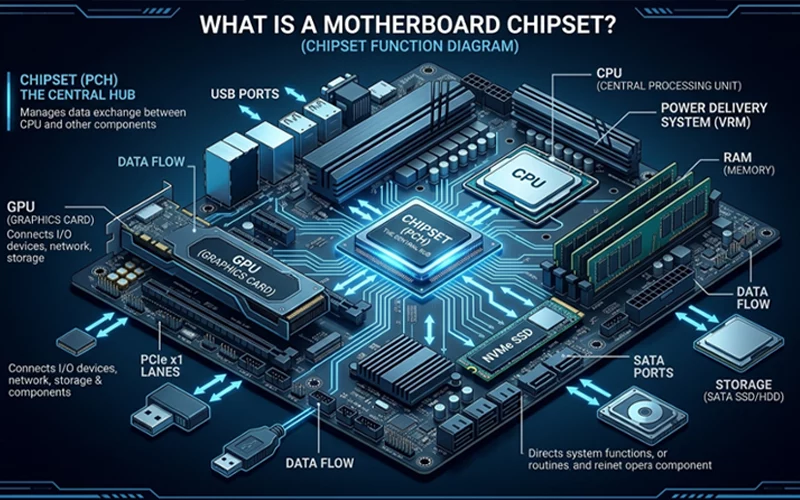
Understanding what is a motherboard chipset can make computer hardware feel a lot less confusing. Many people hear the word when buying a new PC or upgrading their system, but they usually do not know what it actually does. In simple words, it is the set of controllers inside the motherboard that manage how different parts of your computer talk to each other. It decides how powerful your system can be, what features it supports, and how far you can upgrade later.
A motherboard chipset affects the speed of your computer, the type of processor you can install, the number of storage devices you can connect, and even the quality of performance during gaming or heavy work. Because of this, choosing the right one matters more than many people realize. Whether someone is building a new PC or trying to understand their existing system, knowing how it works can save money, avoid mistakes, and improve long-term performance.
Why It’s Called the “Brain Organizer”
Every computer has a brain, which is the CPU. But even the most powerful CPU cannot operate alone. It needs a system that helps it communicate with RAM, graphics cards, storage drives, USB devices, and many other components. That “communication system” is handled by the motherboard chipset.
The chipset decides what the CPU can connect to, how fast data can move, and what features the motherboard can support. It is like the supervisor of the entire motherboard, making sure every signal travels to the right place at the right time. Without it, the CPU, GPU, and memory would not know how to coordinate with each other.
This is why modern motherboards come with advanced chipsets that allow fast memory speeds, powerful graphics cards, and high-bandwidth storage options like NVMe SSDs. If the chipset is old, the whole system becomes limited even if the CPU is strong.
Basic Motherboard Structure Overview
When someone looks at a motherboard diagram, they can see the main parts that manage system communication. Even though every diagram looks slightly different, the core idea remains the same. The CPU connects directly to the memory and graphics card through high-speed lanes. Everything else—like USB ports, SATA drives, Wi-Fi, audio, and PCIe slots—connects through it.
The diagram usually shows two important sections. One is the CPU area, which controls high-performance communication. The second is the chipset area, which handles additional connectivity and directs signals to the CPU when needed. This structure helps the system run efficiently, preventing bottlenecks and managing power distribution. Even a beginner can understand how a PC flows by looking at a simple chipset diagram, because it visually explains how each component interacts with the rest of the system.
Old vs Modern Designs
In older PCs, motherboards had two separate chips known as the northbridge and southbridge. These chips were responsible for different parts of the communication process. Over time, technology improved, and companies combined many northbridge functions directly inside the CPU. This change made communication faster and reduced heat.
Today’s modern systems mainly act as the control center for storage, USB, networking, and expansion ports. They no longer handle memory or graphics communication because the processor itself manages that part. This evolution is the reason modern systems offer much better speed and stability than older generations.
As a result, latest motherboard chipset designs are smaller, more efficient, and more powerful. They are also able to support a wide range of new technologies like PCIe 5.0, DDR5 memory, and high-speed NVMe drives without overheating or slowing down.
Latest Trends and Performance Improvements
The latest motherboard chipset designs focus on future-proofing. Manufacturers know that people want systems that last longer and perform well with new software and hardware. Modern designs support faster PCIe lanes, more USB ports, and advanced networking options such as Wi-Fi 6E and 10-gigabit Ethernet. They also include improved power management, which helps maintain stable performance during long hours of gaming or work.
Another major improvement is support for DDR5 memory, which is faster and more efficient than older DDR4. Many new designs also support PCIe 5.0 lanes that allow extremely fast graphics cards and storage drives. These improvements help users get better speed, smoother performance, and longer upgrade options.
Key Features in Modern AMD Platforms
The newest AMD platform generation brings major performance upgrades. These systems are designed to handle high-end processors and fast technologies like DDR5 memory and PCIe 5.0. They offer more bandwidth for gaming, content creation, and professional workloads. The latest amd motherboard chipset options support better power delivery and improved stability, which helps avoid system crashes during heavy usage.
AMD’s updated platform layout also enhances cooling efficiency. This makes the system quieter and more reliable. Users who want long-term performance gain from these improvements because it stays compatible with future processors and new hardware releases. AMD purposely created these latest designs to offer more upgrade flexibility compared to older models.
Inside the AMD B850 Series
The amd b850 motherboard chipset is a strong choice for users who want advanced features without going to the extreme high-end category. It supports modern processors, providing faster communication channels and excellent memory compatibility. This platform is well-known for handling high-speed storage drives and offering multiple PCIe lanes for graphics cards and expansion cards.
Another useful advantage of the AMD B850 platform is its extended connectivity options. It supports more USB ports, faster networking speeds, and improved power stability. Users who want a balanced system for gaming, editing, or working enjoy the flexibility it offers.
A B850 also benefits from AMD’s updated architecture, which reduces latency and improves response time. This makes everything feel smoother, from loading programs to editing videos.
AM5 vs Other Platforms
The AM5 platform offers several platform options, each designed for different types of users. When people compare these platforms, they usually look for differences in PCIe lanes, USB support, memory compatibility, and upgrade options. The am5 motherboard chipset comparison reveals that higher-end models offer more expansion slots, more bandwidth, and advanced networking support.
Mid-range AM5 platforms focus on offering stable performance for everyday use, gaming, and multitasking. They support fast processors, DDR5 memory, and high-speed storage, making them suitable for most users. High-end models, however, include extra features designed for enthusiasts and professionals who need additional connectivity and power handling.
Understanding these differences helps people select the right option without overspending. Someone who only needs a simple workstation will not require the most expensive model, while a professional editor or developer might need maximum performance.
HP Pavilion Elite HPE-137c Overview
A hp pavilion elite hpe-137c motherboard chipset was designed for a specific pre-built system, offering stable performance for everyday tasks. It supports the communication between the processor, memory, and storage devices, allowing the computer to handle multitasking smoothly. Even though it is an older platform compared to modern systems, it still delivers reliable performance for common usage like browsing, office work, and light media editing.
This platform was built to balance power efficiency and stability. It does not support the newest technologies like DDR5 or PCIe 5.0, but it remains useful for people who use the Pavilion Elite system for routine work. Many users still rely on it because it is stable and works well within the system’s intended purpose.
Simple Explanation of Hardware Differences
Many people struggle to understand motherboard differences because the names and numbers look confusing. But the concept becomes clear when broken down into simple parts. They differ in speed, compatibility, and features. High-end models offer more PCIe lanes, more USB ports, and better memory support. They also handle power more efficiently, which helps high-performance components work at full speed.
Entry-level chipsets focus on affordability. They support basic features and still deliver good performance for everyday tasks. They are perfect for people who do not need advanced gaming or editing capabilities. Mid-range chipsets strike a balance between affordability and features, making them popular for most users.
Each chipset is designed for a specific type of user. The best choice depends on how much performance is needed, what kind of upgrades someone plans to make in the future, and how much they want to spend. Understanding these differences makes PC building and buying much easier.
Motherboard Chipset Comparison
Feature | Entry-Level Chipset | Mid-Range Chipset | High-End Chipset |
CPU Compatibility | Supports basic to mid-tier processors | Works with most modern CPUs | Designed for high-performance processors |
Memory Support | Standard DDR4/DDR5 speeds | Higher stable memory frequencies | Maximum memory speeds with advanced tuning |
PCIe Lanes | Limited expansion capability | Balanced number of PCIe lanes | Highest PCIe bandwidth, including PCIe 5.0 |
Storage Options | Basic SATA and single NVMe | Multiple NVMe + fast SATA support | Several NVMe slots with high-speed PCIe 5.0 |
USB Ports | Fewer ports and slower USB versions | More ports with faster connectivity | Maximum ports with fastest USB standards |
| Networking | Basic Gigabit Ethernet | Improved networking features | Advanced Wi-Fi and multi-Gigabit Ethernet |
Why the Right Choice Matters
A chipset affects more than just initial performance. It decides how far a system can grow in the future. If someone chooses a platform that is too limited, they may not be able to upgrade their processor, add a newer graphics card, or increase memory speed later. A strong platform makes a PC last longer because it supports new technologies as they arrive.
Choosing the right platform also helps avoid stability problems. A good one manages heat, power, and communication more efficiently. This results in smoother multitasking, fewer system crashes, and better responsiveness during heavy workloads.
People who want their PC to stay fast for many years benefit from choosing a chipset that offers modern connectivity and upgrade paths. Even if they do not need those features immediately, they become valuable later when upgrading becomes necessary.
FAQs
What does a motherboard chipset actually do in a computer?
A motherboard chipset manages communication between the processor and other parts like storage drives, memory, and input/output devices. It acts like a control center that directs data where it needs to go so the system runs smoothly and efficiently.
Why is a chipset important for system performance?
It is important because it controls how fast different components can communicate with each other. A better-designed system controller improves speed, reduces delays, and helps the computer handle multitasking without slowing down.
Can upgrading this component improve overall system performance?
Direct upgrades are not always possible, but choosing a newer platform in a system build can significantly improve speed, compatibility, and future upgrade options.
How do I know if my system supports modern hardware like fast memory or advanced graphics cards?
Compatibility depends on the internal platform design, which defines supported memory types, expansion lanes, and device bandwidth limits.
Why do some computers not support newer storage devices?
Older system designs were not built for high-speed storage standards, which limits compatibility with the latest NVMe or PCIe-based drives.
What makes newer computer platforms better for gaming and heavy tasks?
Newer architectures offer faster data transfer, improved power efficiency, and better support for advanced components like high-speed memory and graphics units.
Is it necessary to upgrade the entire system for better performance?
Not always. Sometimes upgrading key components like storage or memory is enough, but older systems may still face limitations due to design restrictions.
How does internal system design affect multitasking performance?
Efficient communication between hardware parts ensures smoother multitasking, faster application switching, and fewer performance delays.
Why do some systems heat up more than others during heavy use?
Heat levels depend on how efficiently power is managed and how well components communicate under load, especially during demanding tasks.
What should I consider before buying a new PC for long-term use?
Focus on future compatibility, upgrade flexibility, and support for modern technologies rather than just current performance numbers.
Final Thoughts
When someone asks, what is a motherboard chipset, the simplest answer is that it is the communication hub of the computer. It silently controls almost everything that happens inside the system. Without a good one, even a powerful processor cannot show its full capability.
Understanding features, differences, and limitations helps people choose systems that last longer and perform better. Whether it is a modern platform like the latest AMD motherboard chipset or an older system like the HP Pavilion Elite HPE-137c, each serves a unique purpose.
Knowing this information gives users more confidence when upgrading, building, or buying a new computer. A chipset is more than a technical term—it is the foundation that shapes the performance, stability, and future potential of the entire PC.
If you want to read more interesting and detailed guides, visit EmbossitWorld now. You’ll find useful Information, and a lot of practical information. Don’t miss out.





Add comment