
Introduction
Every computer stores information in a structured way, whether it is a small text file, a high-resolution photo, a video, an application, or an entire operating system. To understand how much information a computer can store or process, we use standard measurements called computer memory units. These units make it easier to describe everything from a single binary digit to extremely large amounts of digital data.
People often search for a simple computer memory unit definition, but the topic is more useful when you understand how the units relate to one another. A computer does not treat a file as a vague amount of information. Data is represented as bits and bytes, and larger measurements are built from these basic units. Once you understand that structure, terms such as kilobyte, megabyte, gigabyte, terabyte, and petabyte become much easier to understand.
This guide explains the subject in easy English. It covers the smallest and largest measurements, common storage sizes, memory types, a simple chart and diagram, and the reason these terms also appear in puzzles such as NYT and other crossword games. By the end, you should have a clear idea of how digital information is measured and why the correct unit matters.
What Is a Computer Memory Unit?
If you are asking, “what is computer memory unit,” the short answer is that it is a standard measurement used to describe the amount of digital information that a computer can store, access, or process. The basic building blocks are the bit and the byte. A bit is the smallest traditional unit of digital information and can represent either 0 or 1. Eight bits make one byte.
From there, larger units are formed. Kilobytes, megabytes, gigabytes, terabytes, petabytes, exabytes, zettabytes, and yottabytes represent increasingly larger quantities of data. Modern computing can also use newer SI prefixes beyond yotta, including ronna and quetta.
It is important to distinguish a unit of data from a physical memory component. RAM, SSDs, hard drives, memory cards, and USB drives are hardware devices. A gigabyte or terabyte is a measurement used to describe their capacity. In other words, RAM is a type of hardware, while gigabytes are a way of expressing how much data that hardware can hold.
Bits and Bytes: The Foundation of Digital Data
Before looking at large measurements, it helps to understand bits and bytes. A bit, short for binary digit, has two possible values: 0 and 1. Computers use combinations of these values to represent instructions, numbers, letters, images, sound, and other information.
A byte contains eight bits. Because one byte can represent 256 possible combinations of eight binary positions, it is a practical basic unit for measuring digital data. Text characters, for example, are commonly stored using one or more bytes depending on the character encoding.
When you see a file size such as 500 KB or 10 MB, the measurement is based on bytes and larger multiples of bytes. This is why learning the byte first makes the rest of the topic much easier.
A Practical Memory Size Chart
A simple computer memory unit chart can help you see the order of common data measurements. Readers searching for computer memory unit NYT may also be looking for a short answer to a crossword clue.
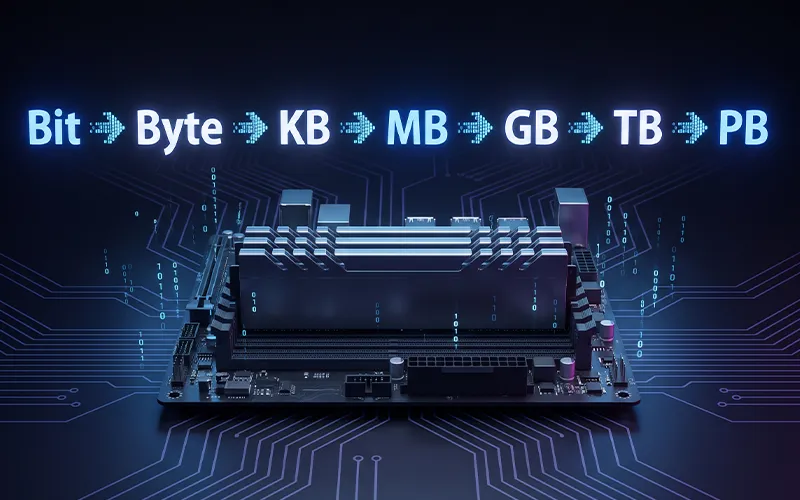
In decimal measurement, 1,000 bytes make one kilobyte (KB), 1,000 KB make one megabyte (MB), 1,000 MB make one gigabyte (GB), and 1,000 GB make one terabyte (TB). Above that, 1,000 TB make one petabyte (PB), 1,000 PB make one exabyte (EB), 1,000 EB make one zettabyte (ZB), 1,000 ZB make one yottabyte (YB), 1,000 YB make one ronnabyte (RB), and 1,000 RB make one quettabyte (QB). At the foundation, eight bits make one byte.
These decimal relationships are commonly used by storage manufacturers. Computers and operating systems may also use binary-based units, where 1 KiB equals 1,024 bytes, 1 MiB equals 1,024 KiB, and so on. The distinction explains why a drive advertised with a particular capacity can appear slightly smaller when viewed inside an operating system.
Common Memory Sizes You See Every Day
Different devices use different amounts of storage or working memory. A small text document may take only a few kilobytes. A collection of photos can require hundreds of megabytes or several gigabytes. Modern games, professional video projects, and large software packages can occupy hundreds of gigabytes.
A smartphone might have storage measured in tens or hundreds of gigabytes. A personal computer may have an SSD with 512 GB, 1 TB, or more. External drives can provide several terabytes of capacity. Businesses and research organizations can manage storage systems measured in petabytes or even larger quantities.
These measurements are not interchangeable. A device with 8 GB of RAM does not have the same purpose as an 8 GB SSD. RAM is temporary working memory used by active programs, while an SSD provides persistent storage that remains available after the computer is turned off.
RAM, Storage, and Why They Are Different
One of the most common sources of confusion is treating RAM and storage as the same thing. Both can be measured in bytes, but they perform different jobs.
RAM is fast working memory. When you open an application, the operating system loads information into RAM so the processor can access it quickly. More RAM can help a computer handle more applications and larger workloads at the same time.
Storage, such as an SSD or hard drive, is designed to keep files and programs for long-term use. When you shut down the computer, information stored on the drive remains there. This is why a computer can have 16 GB of RAM and a 1 TB SSD without the two capacities competing for the same role.
How Binary and Decimal Measurements Differ
You may notice that some computer-related measurements use 1,024 instead of 1,000. This happens because computers work with binary numbers, while storage companies commonly advertise capacity using decimal units.
For example, 1,000 bytes is one kilobyte in the decimal system. In binary measurement, 1,024 bytes is one kibibyte, written KiB. Similarly, MiB, GiB, and TiB are binary units.
This distinction is important when comparing advertised storage capacity with the capacity reported by an operating system. A drive sold as 1 TB uses decimal measurement. The operating system may display a smaller number when converting the same physical capacity into tebibytes.
What Is the Highest Computer Memory Unit?
The answer depends on which measurement system and terminology you are using. Yottabyte was historically the largest widely recognized SI data unit, but the SI system has since introduced ronnabyte and quettabyte prefixes.
A quettabyte is larger than a ronnabyte, which is larger than a yottabyte. In decimal terms, one quettabyte represents 10^30 bytes. These units are enormous and are not normal capacities for personal computers.
So, if a quiz or older educational resource asks for the highest commonly known computer storage unit, it may expect yottabyte. In a modern SI-based discussion, however, quettabyte is the largest officially named decimal prefix currently available.
Why Memory Units Matter
Memory measurements help users compare devices, estimate storage requirements, manage files, and understand computer specifications. Without standard units, it would be difficult to explain whether a device has enough space for a video collection, software library, backup, or database.
They are also important when purchasing technology. A 128 GB phone and a 1 TB laptop have very different storage capacities. Likewise, 4 GB of RAM and 32 GB of RAM can provide very different experiences when running demanding software.
Understanding units also prevents common mistakes. A megabyte is not the same as a gigabyte, and a gigabyte is not the same as a terabyte. Each step represents a major increase in capacity.
Crossword Clues About Computer Memory
Technical terms often appear in crossword puzzles because many of them have short and recognizable answers. One of the most common answers related to digital storage and computing is BYTE. Since a byte is a basic measurement of digital information, it can be used as an answer when a puzzle asks for a four-letter computing term.
When solving a crossword, the number of letters is an important clue. If the answer contains four spaces and the clue refers to a basic data measurement, BYTE may be the answer. However, it is always a good idea to compare the available letters with the clue before making a final choice.
Different puzzle platforms may use slightly different wording for similar questions. Some clues may ask for a short computing term, while others may describe a measurement of digital information. Games such as NYT, Daily Themed Crossword, and Word Hike can also present clues in different formats, so the exact wording and number of letters should always be considered together.
For quick revision, remember that a bit is a single binary value, while a byte consists of eight bits. Larger measurements are built from bytes, including kilobytes, megabytes, gigabytes, and terabytes. Knowing this basic sequence can help both computer beginners and crossword players recognize the correct answer more easily.
What Does “Large Computer Memory Unit” Mean?
The phrase large computer memory unit can refer to any measurement that represents a substantial amount of digital information. In ordinary conversation, gigabytes and terabytes are already considered large compared with kilobytes and megabytes. For the large computer memory unit 7 little words clue, the exact answer should be checked against the number of spaces and crossing letters.
For technical discussions, the phrase can also describe larger units such as petabyte, exabyte, or beyond. A data center may work with petabytes of information, while large-scale scientific and global datasets can reach much higher levels.
How Much Data Fits Into Different Units?
The actual amount of content represented by a unit depends on the type of file. A kilobyte can hold a small text file, but it may be far too small for a modern photograph. A megabyte can store a larger document, a compressed image, or a short audio file.
A gigabyte can hold many photos, songs, documents, or application files. A terabyte can store a very large personal media collection, backups, games, and professional projects. However, file sizes vary significantly because compression, resolution, quality, encoding, and file format all affect the amount of space required.
This is why saying that a gigabyte equals a specific number of photos is only an estimate. A 12-megapixel compressed photo and a high-resolution RAW image can have very different sizes.
Memory Units in RAM
RAM specifications are usually given in gigabytes. Common capacities include 4 GB, 8 GB, 16 GB, 32 GB, and higher amounts for professional workstations and servers.
The amount of RAM needed depends on the workload. Basic web browsing and office applications can work with modest amounts, while video editing, 3D applications, virtual machines, software development, and advanced creative workloads can benefit from more memory.
RAM capacity should not be confused with RAM speed. Capacity describes how much information can be held, while speed and latency describe aspects of how quickly the memory can transfer or access data.
Memory Units in Storage Devices
SSDs, hard drives, USB flash drives, and memory cards are commonly sold in GB or TB. When choosing storage, capacity is only one consideration. Speed, interface, endurance, reliability, and price can also matter.
For example, an SSD can make a computer feel much faster than an older mechanical hard drive because it offers much quicker access to data. However, a larger capacity does not automatically mean a faster drive.
Storage requirements should be based on how the device will be used. Someone who mainly works with documents may need much less space than someone who edits 4K video or maintains large game libraries.
Memory Units and Cloud Storage
Cloud services also use the same basic data measurements. Plans may advertise storage in gigabytes or terabytes, while organizations can manage much larger quantities.
Cloud storage is not magic space with no physical limits. The information is stored on real servers in data centers. The measurement simply describes how much data the service allows a user or organization to keep.
Understanding units helps users compare cloud plans. If one plan offers 200 GB and another offers 2 TB, the second plan provides roughly ten times the decimal capacity.
Common Mistakes Beginners Make
One common mistake is thinking that 1 GB always equals exactly 1,024 MB. That relationship is used in binary measurement, while decimal storage commonly uses 1,000. Another mistake is assuming RAM and storage are interchangeable.
People also sometimes confuse bits and bytes. Internet connection speeds are commonly expressed in bits per second, such as Mbps, while file sizes and storage capacities are commonly described in bytes, such as MB or GB. Because one byte contains eight bits, the distinction can have a noticeable effect when converting between them.
Another mistake is choosing a storage size based only on today’s needs. Photos, videos, applications, games, and backups can grow quickly, so leaving some additional capacity can make a device more convenient over time.
How to Choose the Right Memory or Storage Size
Start by identifying what you actually do with your device. For basic documents, browsing, email, and light applications, you may not need an enormous storage drive. People who work with large media files need more capacity.
For RAM, think about multitasking. If you frequently keep many browser tabs, creative applications, communication tools, and other programs open simultaneously, additional RAM can help.
For storage, think about the size of your current files and future growth. If your computer is used for photography, video editing, gaming, or backups, a larger SSD or an additional external drive may be worthwhile.
The key is not to buy the biggest number automatically. Choose a capacity that matches your workload, budget, and expected future use.
Frequently Asked Questions
- What is a computer memory unit?
A computer memory unit is a standard measurement used to describe digital information capacity. Bit and byte are the basic units, while KB, MB, GB, TB, and larger units represent increasing amounts of data.
- What is the smallest computer memory unit?
The bit is generally considered the smallest traditional unit of digital information. It can have a value of 0 or 1. Eight bits make one byte.
- What is the most common four-letter answer for a computer memory unit crossword clue?
BYTE is a common four-letter answer because a byte is a fundamental unit of digital information. For a specific puzzle, always confirm the crossing letters and clue wording.
- Which Data Unit Is the Highest Named Decimal Unit?
In the modern decimal SI prefix system, quettabyte is the largest officially named unit, equal to 10^30 bytes. Older resources may identify yottabyte as the largest familiar unit.
- What is the difference between a bit and a byte?
A bit represents a single binary value, while a byte contains eight bits. Storage capacities are commonly described in bytes and larger byte-based units.
- Is 1 GB equal to 1,024 MB?
Not always. Decimal units use 1,000-based relationships, while binary units use 1,024-based relationships. The binary equivalents are written as GiB, MiB, KiB, and so forth.
- What Are Large Data Units Used For?
Large units such as terabytes and petabytes are useful for describing large storage systems, databases, backups, cloud infrastructure, scientific datasets, and data centers.
- Why do crossword puzzles ask for computer memory units?
Technical terms are useful in crossword puzzles because many have short, recognizable names. BYTE is especially suitable for four-letter clues, while longer units such as MEGABYTE, GIGABYTE, and TERABYTE can appear when the puzzle provides more spaces.
Conclusion
Understanding digital data becomes much easier once you know how the measurements are connected. The bit is the smallest traditional building block, eight bits form a byte, and larger units grow from there. KB, MB, GB, TB, and larger measurements provide a practical language for describing digital capacity.
The topic is useful far beyond school definitions. It helps you compare RAM, SSDs, hard drives, memory cards, cloud plans, and other technology. It can also help when solving clues such as computer memory unit crossword, computer memory unit NYT, or other word games where a short technical term is required.
The most important lesson is to pay attention to context. A memory unit may describe data capacity, while RAM or storage describes the hardware that holds the data. Decimal and binary measurements can also differ, so checking the unit label matters.
Once you understand these basics, terms that once looked technical become simple. Whether you are choosing a new computer, studying computer fundamentals, managing files, or solving a crossword clue, knowing how digital information is measured gives you a much stronger understanding of modern computing.
If you want to read more interesting and detailed guides, visit EmbossitWorld now. You’ll find useful Information, and a lot of practical information. Don’t miss out.





Add comment