
Introduction
Creating professional-looking visual content used to be difficult for people who had no background in graphic design. Traditional design applications often come with complicated menus, technical tools, and a learning curve that can discourage beginners. Canva changed this experience by making everyday design much simpler and more accessible. What is Canva is a question many beginners ask when they first discover the platform, especially when they see people using it for social media, business, education, presentations, and marketing.
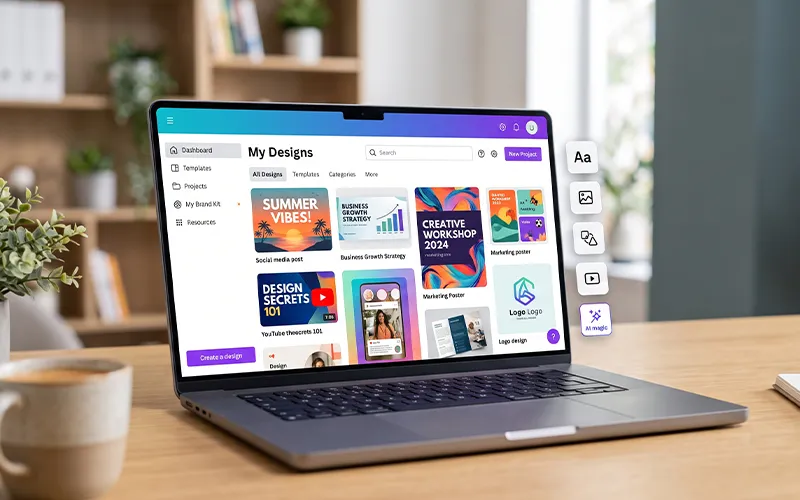
Canva is an online visual design platform that allows users to create a wide range of digital and printable content. It provides templates, photos, illustrations, fonts, videos, graphics, charts, animations, and editing features in one place. Instead of building every design from an empty canvas, users can start with a ready-made layout and customize it according to their needs. This makes the platform useful for people who want attractive results without spending years learning professional design software.
The platform has grown beyond simple graphic creation. Today, users can work on presentations, documents, videos, websites, social media content, educational resources, marketing materials, and collaborative projects. Its AI-powered features have also expanded the way users can approach creative tasks. Whether you are a student preparing an assignment, a business owner promoting a product, or a content creator preparing daily posts, the platform can fit into many different workflows.
What Is Canva For?
If you are wondering what is Canva for, the answer includes much more than creating simple pictures. The platform can be used for personal projects, business communication, marketing, education, social media, presentations, and content creation.
A student might use it to prepare a presentation or infographic. A teacher can create classroom materials, worksheets, certificates, and educational posters. A business can prepare promotional graphics, menus, brochures, advertisements, and social media content.
Content creators can use it for YouTube thumbnails, Instagram graphics, video covers, story designs, and promotional material. Freelancers can also use it to prepare client presentations, proposals, social media packages, and marketing assets.
The main advantage is flexibility. One platform can support many different creative tasks instead of requiring a separate application for every project.
How the Platform Works
Understanding what is Canva and how does it work becomes easier when you look at the basic workflow.
Start by selecting the design format that best fits your project.You can search for a specific format or select one from the available categories. If you know the exact size you need, you can also work with custom dimensions.
Next, select a template or begin with a blank canvas. Templates are useful because they provide a starting layout with fonts, colors, images, and other elements already arranged.
After selecting your starting point, customize the content. Replace sample text with your own information, upload your images, change colors, adjust fonts, and move elements until the design matches your purpose.
Once everything looks right, review the design carefully. Check spelling, alignment, image quality, spacing, and readability. You can then export the finished project in an appropriate format or share it digitally.
This workflow is simple enough for beginners but flexible enough for many everyday professional tasks.
A Complete Look at Canva’s Design Software
What is Canva software? It is cloud-based design software that allows users to create and edit content through an online interface. It is available through the web and also supports applications for compatible devices.
Because projects are associated with a user’s account, working online can make it easier to access designs from different locations and devices. This is useful for people who move between home, school, office, or other workplaces.
The software brings templates, media resources, editing tools, collaboration options, and other creative features into one environment. Instead of installing several separate programs for basic design tasks, many users can complete their everyday work within the same platform.
Why Canva Templates Are So Popular
Templates are one of the platform’s most useful features. They give users a ready-made structure instead of forcing them to begin with an empty page.
Suppose you need to create a restaurant promotion. Rather than deciding where the headline, food photo, price, logo, and contact details should go, you can start with a suitable template and replace the sample content.
Templates are also useful for people who publish content regularly. A social media manager can create a reusable design and update the text and images for different campaigns.
However, templates should be treated as a starting point rather than a final solution. Customizing the design with your own branding, photography, colors, and messaging can make the result feel more original and professional.
What Is Canva Pro?
The question what is Canva Pro usually comes from users who want to understand the difference between the standard experience and the premium plan.
Canva Pro is a paid subscription that provides access to additional content and features. Depending on the current plan, these can include premium templates, stock assets, advanced brand tools, background removal, resizing capabilities, and other productivity features.
For a professional content creator, marketer, freelancer, or business owner, these features can make repetitive design work more efficient.
However, paying for a subscription does not automatically improve a design. Good results still depend on the user’s ability to communicate clearly through typography, layout, images, colors, and visual hierarchy.
Canva Teams: Features, Benefits, and How Team Collaboration Works?
What is Canva Teams is another common question among businesses and organizations that need multiple people to work on creative projects.
Team-oriented features allow groups to collaborate on designs, manage shared resources, and maintain a consistent visual identity. A company may have several people involved in content production, and a shared workspace can make the process easier to organize.
For example, a marketing team can prepare templates that follow the company’s branding. Different team members can then use those templates for social media campaigns without rebuilding every design from scratch.
Collaboration can also reduce the need to send multiple versions of files through email or messaging applications. Instead, team members can work within a shared creative environment.
Canva for Business Marketing
Businesses need visual content for many different purposes. Social media campaigns, advertisements, product announcements, presentations, brochures, flyers, menus, and promotional graphics all require some level of design.
Small businesses especially can benefit from accessible design tools because they may not have a full-time designer available for every small project.
For example, a clothing store can create product promotion graphics, while a restaurant can prepare daily deal posts. A service provider can create educational graphics explaining its services.
The important thing is to use the tool as part of a larger marketing strategy. Design should support a clear message, target audience, offer, and business objective.
What Is Canva for Education Software?
What is Canva for education software is particularly relevant to teachers and students who need to create visual learning materials.
Education-focused features can help teachers prepare presentations, lesson materials, worksheets, posters, certificates, and other classroom resources. Students can use the platform for project presentations, infographics, posters, and visual assignments.
Visual communication can make information easier to organize. Instead of presenting a long list of facts, a teacher can use an infographic to divide information into sections with headings, icons, illustrations, and short explanations.
The exact education features and eligibility requirements can vary, so schools and educators should check the current education offering before relying on a specific feature.
What Is Canva UGC?
The phrase what is Canva UGC is generally related to the use of the platform for creating or editing user-generated content.
UGC means content created by customers, users, or independent creators. Reviews, testimonials, customer photos, product demonstrations, and social media posts are common examples.
Canva can help businesses turn this material into polished marketing content. For example, a company could take a customer testimonial and place it into a branded social media template.
The platform is not the definition of UGC itself. Instead, it can be used as a tool for organizing, editing, branding, and repurposing UGC for different marketing channels.
What Is Canva Magic Studio?
What is Canva Magic Studio? It is a group of AI-powered features created to help users perform certain creative tasks more quickly.
AI-assisted functionality can help with tasks such as generating content, transforming designs, editing images, creating text, and exploring creative ideas. The available features can change over time as new AI capabilities are introduced.
For beginners, these tools can be useful when they have a general idea but are unsure how to turn it into a finished design.
AI should still be treated as an assistant rather than a replacement for human judgment. Generated text, images, and layouts should be reviewed carefully before publication.
How AI Changes Content Creation
AI has made many creative workflows faster. Instead of manually completing every repetitive task, users can use AI-assisted features to generate ideas, modify content, or create an initial version of a project.
The human creator remains important because AI-generated content may need editing, fact-checking, brand adjustments, or creative refinement.
For example, a marketer can use AI to generate a starting concept and then adjust the design to match the company’s identity. A content creator can generate ideas and then rewrite them in a personal voice.
The most effective approach is often a combination of automation and human creativity.
What Is Canva Affinity?
If you are researching the broader Canva ecosystem, you may come across what is Canva Affinity.
Affinity refers to a professional creative software suite associated with graphic design, photo editing, and page layout. Canva’s acquisition of Affinity expanded its presence in professional creative software.
This is important because the two approaches serve somewhat different needs. Canva is widely recognized for its simple, template-driven workflow, while Affinity is associated with more detailed professional design work.
For users who eventually need more advanced creative control, the broader ecosystem provides another path beyond simple template-based projects.
Creating Better Designs
Knowing how to use the editor is only one part of good design. The quality of the final result also depends on how you arrange information.
Start with a clear purpose. Decide what the viewer should notice first and what information should come afterward.
Use readable fonts and avoid filling the design with too many different typefaces. Choose colors that work together and make sure text is easy to read against the background.
Images should support the message instead of distracting from it. White space is also important because giving elements enough room can make the design feel cleaner and easier to understand.
A simple design with a clear message is often more effective than a complicated design filled with unnecessary elements.
Canva for Presentations
Presentations are another area where the platform can be useful.
Instead of creating every slide manually, users can select a presentation template with an established visual structure. They can then add their own headings, images, charts, statistics, and supporting information.
Good presentation design should keep slides easy to understand. Avoid putting entire paragraphs onto individual slides when a few clear points would communicate the idea better.
Use visual elements to support your spoken explanation rather than making the slide itself carry every piece of information.
Limitations You Should Know
Although the platform is powerful, it is not suitable for every design requirement.
Professional designers working on highly specialized projects may need software with deeper controls and advanced technical features.
Some premium templates, assets, and tools may require a paid plan. Users should therefore understand which features they actually need before subscribing.
Another limitation is overdependence on templates. If everyone uses the same design without meaningful customization, content can start looking generic.
Finally, good design still requires human creativity. Software can provide tools and resources, but the person using them must decide how to communicate the message effectively.
Frequently Asked Questions
1. Is Canva free to use?
Yes, Canva offers a free option with a range of templates, design tools, and resources. Some advanced features and premium content require a paid subscription.
2. Can beginners learn Canva easily?
Yes. The simple interface, templates, and drag-and-drop editing make it relatively easy for beginners to understand. Regular practice can help users become more confident.
3. Can Canva be used for business?
Yes. Businesses can use it for social media graphics, presentations, advertisements, brochures, flyers, menus, product promotions, and other marketing materials.
4. Is Canva useful for students?
Yes. Students can use it for presentations, infographics, posters, project graphics, resumes, and other visual assignments.
5. Can Canva create videos?
Yes. Canva supports video creation and editing features that allow users to combine clips, images, text, audio, transitions, and other visual elements.
6. Is Canva Pro worth paying for?
It depends on your needs. Frequent users who need premium resources and advanced productivity features may benefit from Pro, while occasional users may find the free version sufficient.
7. Can teams work together in Canva?
Yes. Team collaboration features allow multiple users to work with shared designs, resources, templates, and brand materials.
8. Can Canva replace professional design software?
For many everyday projects, it can be enough. However, professional designers working on complex projects may still need specialized software with more advanced controls.
Final Thoughts
So, what is Canva? It is an accessible online design platform that brings templates, creative resources, editing tools, collaboration, and AI-assisted features into one convenient environment.
Its biggest strength is simplicity. Someone with little or no design experience can create a useful visual project within a short time, while experienced users can use templates and automation to speed up repetitive work.
Whether you are creating social media content, educational materials, presentations, marketing graphics, videos, or business documents, the platform offers a flexible way to turn ideas into visual content.
The key is not simply to use templates and add information. Learn basic design principles, customize your projects, maintain consistent branding, and always focus on the audience you are trying to reach. When used thoughtfully, Canva can become a valuable part of a personal, educational, or professional creative workflow.





Add comment